










Voice over Internet Protocol (VoIP) Resources
5 Best VoIP Phones for SA Businesses with Hybrid Teams
Hybrid working has changed how South African businesses communicate.
Employees now move between desks, meeting rooms, warehouses, client sites, and home offices — often within the same week. Traditional phone systems, designed for fixed desks and predictable call patterns, no longer support this reality.
South Africa’s VoIP desk phone market reached USD 50 million (ZAR 839 million) in 2025 and is projected to grow to USD 73 million (ZAR 1.2 billion) by 2033. This expansion reflects businesses adapting their communication infrastructure to a fundamental change in how teams operate.
VoIP offers a more flexible approach, with different phone types designed for specific roles, environments, and workflows. Instead of deploying the same desk phone across the business, organisations can match communication tools to how teams actually operate.
Contact United Telecoms online or at 086 001 8500 to explore which VoIP phone combinations suit your hybrid team communication needs.
Key Takeaways:
- Hybrid teams need diverse VoIP solutions: DECT, Wi-Fi, desk phones, softphones, and conference phones. Each serves specific workflows.
- South Africa’s VoIP desk phone market is projected to grow from R839 million in 2025 to R1.2 billion by 2033.
- Softphones eliminate physical hardware costs while providing full PBX features for remote and hybrid workers, anywhere with an internet connection.
- Combining multiple phone types delivers better results than deploying a single standardised device across all business teams.
What Do Hybrid Teams Actually Need From Their VoIP Phones Today?
Hybrid teams don’t share a single communication pattern.
VoIP phones must support diverse working environments without compromising call quality or core functionality.
Key requirements include:
- Location flexibility: Phones must work across different places, such as offices, home offices, and client sites, without changing numbers or call handling.
- Mobility: Staff should stay reachable while physically moving within a site, such as across retail floors, warehouses, or large facilities.
- Professional call features: Call transfers, extensions, voicemail, and call queues must be available on all devices.
- High-capacity call handling: Reception, sales, and support teams need tools to efficiently manage multiple conversations.
- Quality audio: Clear voice pickup is essential in meeting rooms and collaborative spaces.
- Environment suitability: Devices should suit their surroundings, from desk-based offices to noisy or industrial environments.
Below, we explore five types of VoIP phones that address different operational requirements.
1. DECT Phones: Reliable On-Site Mobility
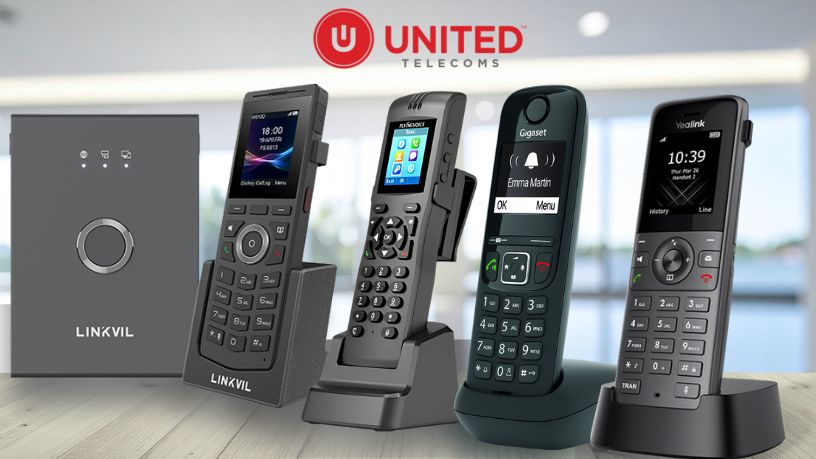
DECT (Digital Enhanced Cordless Telecommunications) phones are VoIP-enabled handsets designed for reliable wireless mobility within defined on-site coverage areas. They operate through dedicated base stations, typically offering coverage of up to 50 metres indoors and 300 metres outdoors per base station.
DECT phones are well-suited to roles that require staff to move continuously within a facility while remaining reachable. Retail teams can assist customers anywhere on the shop floor, while warehouse and logistics staff can coordinate receiving and dispatch without returning to fixed desks.
Key DECT capabilities include:
- On-site mobility: Seamless movement within defined coverage areas
- Scalable coverage: Single-cell systems for small teams and multi-cell systems supporting hundreds of handsets
- Consistent call quality: Dedicated radio spectrum avoids congestion from shared Wi-Fi networks
- Shift-ready battery life: Typically 8 to 13 hours of talk time
United Telecoms supplies cordless DECT phone systems from Yealink, Snom, Fanvil, and Gigaset.
2. Wi-Fi Phones: Mobility Across Larger Sites and Campuses
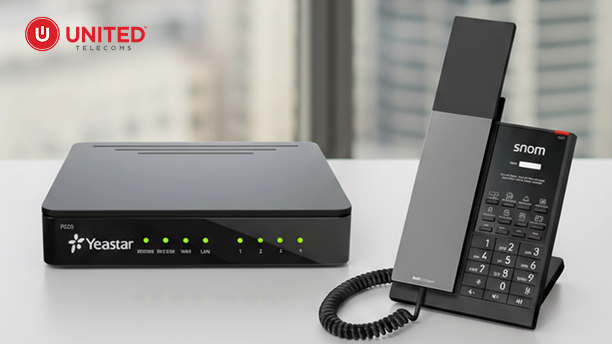
Wi-Fi phones provide wireless VoIP calling over an organisation’s existing Wi-Fi network, rather than using dedicated base stations. This makes them a practical option for businesses with strong, well-managed wireless infrastructure already in place.
Wi-Fi phones are available in two form factors:
- Desk phone models: Standard desk phone functionality with Wi-Fi connectivity instead of Ethernet
- Cordless handset models: Portable devices for on-the-move communication
Unlike DECT phones, Wi-Fi phones support broader mobility across buildings or campus environments, provided Wi-Fi coverage is consistent. Staff can move between floors, buildings, or adjacent sites while staying reachable, provided handover between access points is reliable.
Wi-Fi phones offer unique flexibility:
They’re mobile not only across a single site, but can also be relocated to different locations or home offices with good internet connectivity. This makes them particularly valuable for hybrid workers who split time between multiple locations.
Wi-Fi phones are commonly used by:
- Security and facilities teams patrolling multiple buildings
- Logistics coordinators moving between warehouses or yards
- Operational staff working across large sites or campuses
- Hybrid workers who need the same device in office and home environments
Key considerations include:
- No Ethernet cable required: Only power needed (via adapter or PoE), making setup simple anywhere with Wi-Fi
- Dependence on Wi-Fi quality: Call reliability is tied directly to network performance
- Rugged device options: Some models offer IP67-rated protection for industrial environments
- All-day battery life: Typically 9 to 13 hours of talk time (for cordless models)
United Telecoms supplies portable Wi-Fi phones from Fanvil, Snom, and other manufacturers.
3. Desk Phones: Comprehensive Features for Fixed Workstations
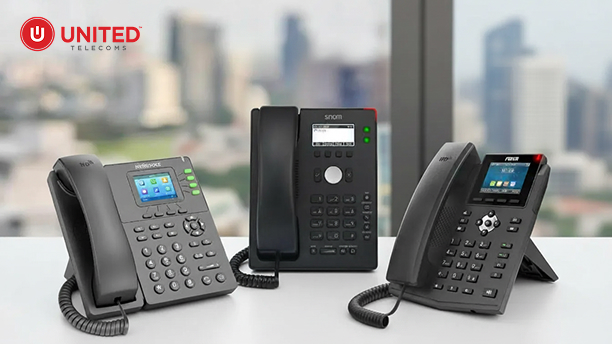
Desk phones remain the best option for staff who are primarily desk-based and handle high call volumes. Modern VoIP desk phones provide robust call-management features for reception, sales, support, and administrative roles.
Rather than multiple physical lines, VoIP desk phones support multiple SIP accounts, allowing users to manage different numbers, queues, or extensions from a single device. This enables receptionists to handle main, sales, and support calls efficiently, and allows managers to monitor team availability and call status.
Desk phones work anywhere with internet connectivity: Even if an agent is working from home, they can connect the desk phone via an Ethernet cable and remain fully connected to the company’s VoIP system. This allows remote workers to maintain the same presence, features, and capabilities as if they were in the office, including extension dialling, call transfers, and queue participation.
Common desk phone features include:
- Programmable keys: One-touch access to extensions, call transfers, and functions
- Clear visual interfaces: Displays showing caller details and call activity
- HD audio: Reliable clarity in busy office environments
- Ethernet connectivity: Requires Ethernet cable for connection to the network
VoIP Desk phones range from entry-level models for general office use to executive devices with touchscreens and built-in conferencing. United Telecoms supplies desk phones from Yealink, Snom, Fanvil, and Flyingvoice, with models supporting 2 to 20 SIP accounts.
4. Softphones: Professional PBX Features Without Physical Devices
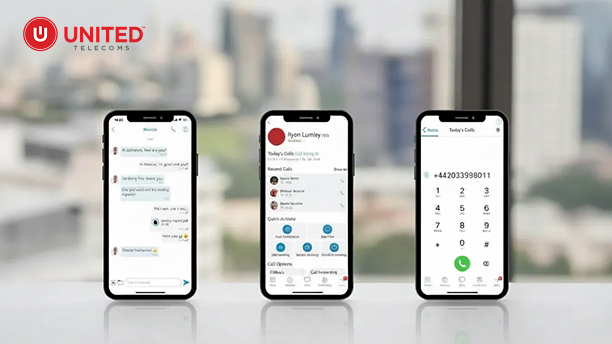
Softphones are software applications that turn computers and mobile devices into fully featured business phones. They connect directly to VoIP systems, allowing users to make and receive calls using their business number from virtually any location.
Softphones can be accessed on:
- Desktop and laptop computers (Windows and macOS)
- Smartphones and tablets (Android and iOS)
They provide the same core capabilities as desk phones, including call transfers, extensions, voicemail, call queues, and caller ID. Inbound calls route to a user’s softphone extension regardless of where they are working.
Softphones are particularly valuable for remote and hybrid teams. They eliminate the need for physical hardware in home offices, reduce mobile call costs, and enable organisations to quickly activate or deactivate users. This makes them well-suited to remote staff, contractors, and seasonal teams.
The United Voice Cloud App includes mobile and desktop softphone applications for Android, iOS, Windows, and macOS.
5. Conference Phones: Audio Quality for Collaborative Spaces
Conference phones are purpose-built VoIP devices designed to deliver clear, natural audio in shared meeting spaces. They use omnidirectional microphones and high-powered speakers to ensure everyone in the room can be heard clearly, regardless of seating position.
Advanced conference phones include features such as:
- Beamforming microphones: Focus on active speakers while reducing background noise
- Echo cancellation: Prevents feedback and audio loops
- Automatic gain control: Maintains consistent volume levels across participants
Conference phone systems scale to suit different room sizes. Compact models are ideal for huddle rooms with 4 to 6 participants, while larger boardroom-grade systems support 15 or more participants using expansion microphones.
When connected directly to a VoIP system, conference phones enable one-touch dialling and integrate seamlessly with desk phones and softphones. United Telecoms supplies conference phones from leading brands including Yealink, Snom, and Fanvil.

Matching IP Phones to Real-World Workflows
Most organisations achieve better results by deploying a combination of VoIP phone types, rather than standardising on a single device across the business. The right mix depends on how different teams operate day-to-day.
Typical examples include:
- Retail businesses: Desk phones for head office teams, DECT phones for shop floor staff assisting customers, softphones for regional managers working remotely, and conference phones in meeting rooms.
- Manufacturing and logistics operations: Desk phones for administrative teams, Wi-Fi phones for warehouse and yard staff who require wider on-site mobility, and conference phones in control rooms or operations centres.
- Professional services firms: Desk phones for reception and support teams, softphones for consultants working remotely or at client sites, and conference phones for internal and client meetings.
- Call centres: Desk phones and softphones both provide essential features, including CRM integration, call recording, and performance tracking for key metrics like call volumes and handle times. For hybrid teams, softphones offer the advantage of seamless operation across office and home locations with uninterrupted system connectivity.
The objective is to align each phone type to how communication actually happens, rather than forcing teams into a one-size-fits-all setup.
Team Management and Performance Visibility
United Telecoms provides comprehensive management tools to support hybrid teams:
Standard Team Management System: Built-in dashboard for basic team oversight and call monitoring.
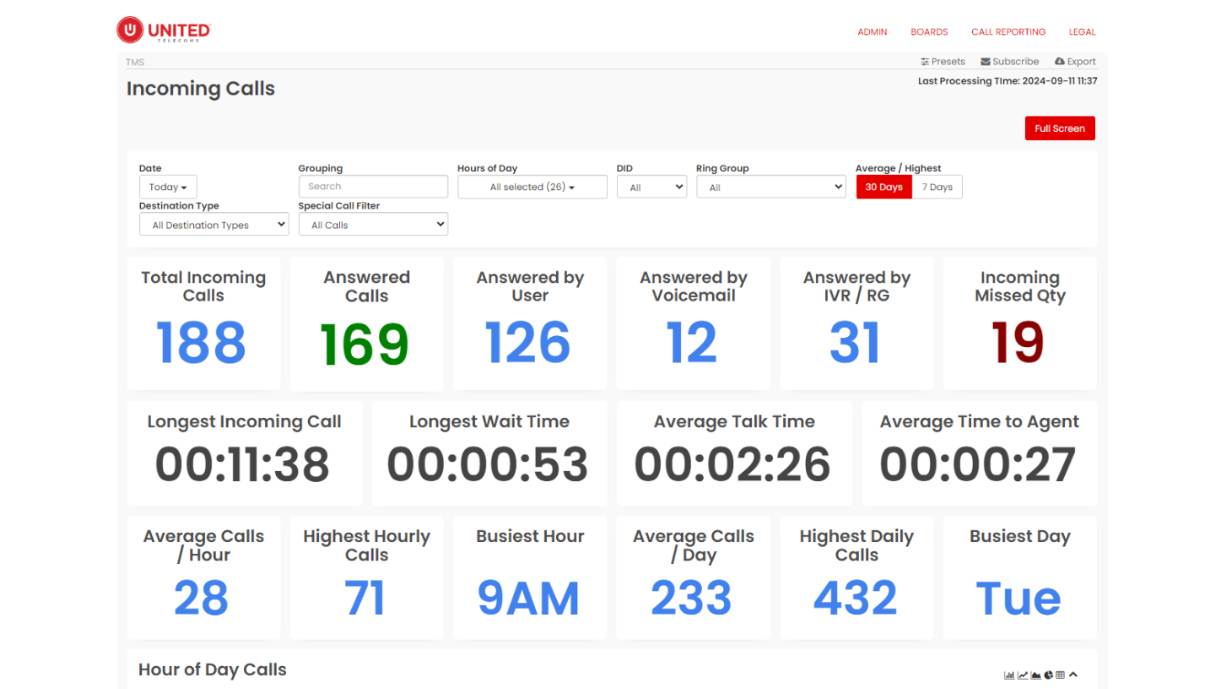
Advanced Analytics System: For organisations requiring deeper insights, we offer an advanced system to track detailed data and analytics. This Team Management System (TMS) provides managers with complete visibility over hybrid teams, including:
- Real-time presence status (online/offline/on call)
- Agent performance monitoring
- Telephone system statistics (missed calls, total inbound calls, average call times, wait times)
- Historical reporting and trend analysis
These tools ensure managers can effectively oversee distributed teams regardless of their physical location, maintaining service quality and operational efficiency across hybrid work environments.
Getting Started
VoIP deployments typically begin with a review of how different teams communicate.
Key questions to consider include:
- Which roles require on-site mobility?
- Where do high call volumes occur?
- Which teams rely most on meetings and collaboration?
- Do you need advanced performance monitoring and analytics?
Answering these questions helps identify the right combination of VoIP phones for your organisation. Most implementations are completed within 4 to 6 weeks, depending on team size and infrastructure readiness.
Contact United Telecoms online or at 086 001 8500 to explore which VoIP phone combinations align with your hybrid team requirements.
Got questions? Contact our experts today.
We service the following locations in South Africa
Western Cape: Cape Town, Belville, Paarl, Stellenbosch, Somerset West, Vredendal, Hout Bay, Green Point, Bloubergstrand, Durbanville, Melkbosstrand.
Eastern Cape: Port Elizabeth, Knysna, East London, George.
Kwa-Zulu Natal: Durban, Pinetown, Ladysmith, Newcastle, Ballito, Port Shepstone, Pietermaritzburg, Umhlanga, Westville, Hillcrest, Amanzimtoti.
Gauteng: Johannesburg, Vereeniging/Vaal, Sandton, Midrand, Pretoria, Centurion, Randburg, Roodepoort, Germiston, Alberton, Edenvale, Menlo Park.
Free State: Bloemfontein, Welkom, Bethlehem.
Mpumalanga: Witbank, Nelspruit.
Northern Cape: De Aar, Kimberley, Repra (Upington Area).
North West: Klerksdorp, Mafikeng.
Limpopo: Phalaborwa, Polokwane/Pietersburg.
Outside South Africa: Botswana, Zimbabwe, Swaziland, Namibia, Mozambique.
Get In Touch
Head Office
19 Trinity Close
Cambridge Commercial Park
Paulshof
Sandton
Tel: 086 001 8500
Email: info@unitedtelecoms.net
6 Edison Way
Century City
Cape Town
Tel: 086 001 8500
Email: info@unitedtelecoms.net
12 Sookhai Place
Derby Downs Office Park
Westville
Tel: 086 001 8500
Email: info@unitedtelecoms.net
What Our Customers Say
“Once we approved the installations we were kept up to date daily with the levels of progress on our various sites and were very impressed with the final installation”
Spear Properties
We're the experts so that you don't need to be!
PBX Phone System
Beginner's Guide
Voice & Hosted PBX
Resources
PABX Relocation and
Reinstallation
PBX Phone System
Resources